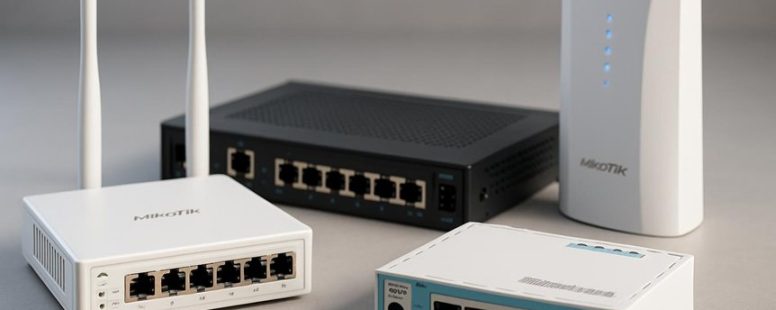
Navigating the world of Mikrotik routers is like exploring a vast forest—each path leading to different performance landscapes and features. You might assume that all models offer similar power, but the truth is more intriguing.
Choosing the right router isn’t just about grabbing the latest or priciest option; it’s about discovering a device that fits your needs like a glove, ensuring your network remains secure, scalable, and effortless to manage.
Surprisingly, some models unlock hidden perks—like seamless updates that keep your system ahead of the curve. Understanding these subtle differences can turn your network from a tangled web into a smooth-running engine—saving you time, money, and headaches along the way.
How to Choose the Right Mikrotik Router for Your Needs
Choosing the right Mikrotik router can seem tricky, but it’s easy once you know what to look for. First, you need to decide what kind of network you want to run. Are you setting up a simple home Wi-Fi or a larger business network? If it’s just for your house, a small router like the Mikrotik hEX or hAP series might be enough. If you need more power and features for a bigger office, you might need something like the CCR series.
Next, think about how much your network will grow. Will more devices connect later? Choose a router that can handle more connections so you don’t have to buy a new one soon. For example, Mikrotik’s RB4011 can support many devices and high traffic, making it good for busy homes or small businesses.
Budget also matters. Mikrotik routers range from budget-friendly options to more expensive models. Don’t spend too much if you only need basic features. But if you want advanced options like VPNs or multiple Wi-Fi networks, investing in a higher-end model makes sense. Remember, cheaper routers might not last long or keep your network safe.
Brand reputation and reviews are worth checking. Mikrotik is known for reliable gear, but some models can be complicated to set up or manage. Read customer reviews on sites like Amazon or TechRadar to find out if a router works well in real life. Also, look at how often Mikrotik updates its software. Regular updates fix bugs and security issues, so pick a model with good support.
Some people worry about support. Mikrotik offers forums and manuals, but if you’re new, you might want a model with easier setup or better customer help. Also, consider whether you need advanced features like VLANs, QoS, or multiple SSIDs. These are useful for managing traffic and security but might be overkill for simple use.
Essential Features for Mikrotik Routers: Performance, Security, and More
When picking a Mikrotik router, you should look at how fast it can handle data and how quick it responds. These are called performance features. For example, a router with high throughput can send lots of data at once, which is good for streaming videos or gaming. Latency measures how fast the router reacts when you click or type. Lower latency means less lag. Both matter because slow routers can cause buffering or delays.
Security is just as important. Mikrotik routers have different security features like firewalls and VPNs to protect your network. Some models have better tools for blocking bad websites or stopping hackers. For example, if you work from home or handle sensitive info, you want a router with strong security options. But be careful—more security features can sometimes slow down your network or make setup harder.
There are two main ways to choose the right Mikrotik router. First, compare how much data it can handle and how fast it responds. Second, check what security tools it offers. Some routers are faster but less secure, while others are more secure but might be slower. Think about what matters most for your internet use. Are you streaming, gaming, or running a small business? Knowing this will help you pick the best model.
Performance Metrics Overview
Performance metrics are the key to choosing the right Mikrotik router. They tell you how fast and reliable your network will be. Knowing these facts helps you find a router that keeps your internet working smoothly.
First, look at bandwidth. Bandwidth is how much data your router can handle at once. If you stream videos or play online games, you want a router with high bandwidth to avoid lag. Traffic prioritization is also important; it makes sure your important data gets through first. For example, if you’re on a video call, good prioritization keeps the call clear without interruptions.
Next, check latency. Latency is the delay between sending and receiving data. Less delay means your internet feels faster. For example, gamers want low latency so the game responds quickly. High latency causes delays and frustration. Some routers have features to reduce latency, but not all do equally well.
Network throughput measures how much data your router can send and receive in a second. A higher throughput means faster internet speeds. It matters a lot if multiple devices are connected at once. Effective Quality of Service or QoS settings help manage traffic and keep everything running smoothly. Without good QoS, your Wi-Fi might slow down when many devices use it.
Device compatibility is another factor. Your router should support all your gadgets, like smartphones, smart TVs, and printers. If it doesn’t, some devices may have trouble connecting or working properly. Also, keeping your router’s firmware updated helps improve speed and fix bugs. Many Mikrotik models have regular updates that make your network better over time.
Wireless standards and signal strength are key too. Newer standards like 802.11ac or ax offer faster speeds. A strong signal reaches farther and makes your Wi-Fi more reliable. For example, if your house is big, a router with good signal strength makes sure every room gets good internet.
Finally, look at the user interface. A simple and clear menu makes managing your network easier. If settings are confusing, you might miss important features or make mistakes. Good routers come with easy-to-use apps or dashboards.
Security Features Comparison
When choosing a router, security is just as important as speed. If a router is fast but has weak security, hackers could still get into your network. Here are the main security features to look for in Mikrotik routers, with clear reasons why they matter:
1. Firewall and access controls
A good firewall blocks unwanted devices from connecting. It keeps your network safe from outside threats. For example, Mikrotik routers can set rules to stop strangers from accessing your Wi-Fi. But be aware that some firewalls are easier to configure than others. If not set up right, they might not protect you well.
2. VPN support and encryption
VPNs let you connect securely to your home network from anywhere. Mikrotik routers support different VPN protocols and use strong encryption. This keeps your data safe, even on public Wi-Fi. Still, some VPN options are simple, but others need technical skills. Make sure the router’s VPN features match your needs.
3. Threat detection and firmware updates
Good security includes detecting threats early and fixing known problems. Mikrotik offers firmware updates to patch security holes. Without these updates, hackers can find ways to break in. But updates can sometimes cause issues or need technical know-how to install properly.
In the end, a router with strong security features helps protect your network without slowing down your internet speed. Remember, no router is perfect. Be ready to change settings and stay updated. That’s how you keep your home or office safe.
—
Counter-strategies from different perspectives:
The Ruthless Competitor: This version simplifies the features but might oversell security without emphasizing the need for proper setup or the risks of false security. It also fails to mention that some features are not easy for average users.
The Cynical Consumer: The info seems basic. I’ve seen many claims about security that are hard to verify. How do I know Mikrotik really keeps threats out? What about false positives or security flaws they haven’t fixed yet?
The Distracted Scroller: I’d probably only remember that Mikrotik has firewall, VPN, and updates. The details about setup difficulty or limitations are easy to forget. The writing needs to catch the eye quickly and be simple enough to scan.
Final note: This version tries to balance clarity, honesty about limitations, and practical advice, while avoiding overly technical language.
Understanding Mikrotik RouterOS and Its Benefits for Your Network
Mikrotik RouterOS is a software system used to run Mikrotik routers. It is popular because it offers many features that help manage networks better. You can use it to set up VPNs, control traffic, and improve network speed. Its interface might look complicated at first, but once you learn the basics, it’s pretty easy to use. Regular updates from Mikrotik fix bugs and add new features, making sure your network stays safe and works well.
Many people like the active community forums where users share tips and solutions. This makes fixing problems faster and easier. Still, some users find the many settings confusing, especially if they are new to networking. Also, Mikrotik RouterOS is powerful but may be overkill for small or simple networks.
In comparison with other options like Cisco or Ubiquiti, Mikrotik is often cheaper but can have a steeper learning curve. If you need advanced control and don’t mind learning some technical stuff, it’s a good choice. However, if you want something easy to set up with little fuss, other brands might be better.
Mikrotik Routers for Home and Small Office Use
Mikrotik routers are a good choice for home or small office use because they offer decent speed without costing too much. They are easy to set up, even if you’re not a tech expert.
If you want a simple way to get your network running smoothly, Mikrotik has some models that are easy to use. For example, the Mikrotik hAP series is popular with people who want reliable Wi-Fi at home. These routers can handle multiple devices like smartphones, laptops, and smart home gadgets all at once.
However, some users might find Mikrotik’s setup a bit confusing at first. The interface is not as simple as other brands like Netgear or Asus. If you don’t have much experience with networking, it might take some time to learn how to get everything working right.
Performance and Speed
Mikrotik routers are known for providing reliable speed and good traffic management. Here’s what makes them stand out for home and small office use:
Clear traffic control: Mikrotik’s QoS tools let you set priorities for devices and apps. For example, you can ensure your video calls stay clear and downloads don’t slow down. This helps keep everything running smoothly, even when many devices are connected.
Fast and steady connections: Mikrotik routers help reduce lag and keep your internet stable. If you play online games or work from home, this means lower ping and fewer disconnects. That’s a big plus for anyone who needs a dependable connection.
Works with many devices and updates often: Mikrotik supports lots of different gadgets, so you won’t have compatibility issues. Plus, they regularly update their firmware, which helps improve signal strength and fix bugs. Keeping your router updated means smoother performance over time.
Some people might worry about the complexity of Mikrotik routers. They are powerful but can be tricky to set up without some technical knowledge. Also, not all models are equally easy to use, so beginners might find some features confusing.
In the end, if you want a router that balances speed and traffic control, Mikrotik is worth considering. They often outperform basic home routers in managing multiple devices and keeping your internet fast and stable. But be prepared to spend some time learning how to use them properly.
Ease of Setup
Getting a Mikrotik router set up is easier than many think. It is a good choice if you want to control your internet speed or manage traffic well. The user interface is simple to understand, even if you’re not a tech expert. You can quickly set up the wireless and monitor your network without much trouble. Mikrotik also provides clear installation guides that help you check if your devices are compatible and walk you through the initial setup step by step. Updating the firmware is straightforward, which helps keep your router safe and running well. If you run into problems, Mikrotik’s support and troubleshooting tips can save you time and frustration. Once you get comfortable, advanced options allow you to fine-tune your network. Overall, setting up a Mikrotik router for home or small office use is usually faster and simpler than many people expect.
Best Mikrotik Routers for Growing Businesses
Choosing the right Mikrotik router for your growing business can make a big difference in how smoothly your network runs. To pick the best model, you should look for devices that can handle more users, faster speeds, and more data over time. Here are some top options that fit these needs:
Mikrotik hEX S – This router is great for small offices. It has five Gigabit ports, which means it can connect multiple devices quickly. It’s affordable and easy to set up. If your team is small but growing, this one can keep up without breaking the bank.
Mikrotik CCR1009 – This one is better if you expect your business to grow fast. It can handle a lot of internet traffic and has advanced features for security and management. It’s more powerful and flexible, but it costs a bit more.
Mikrotik RB4011 – This router is good for mid-sized companies with many employees. It has a fast processor and multiple ports. It’s like a reliable workhorse that can keep up with your expanding needs.
All three routers can grow with your business. They’re reliable choices that won’t need replacement every year. But keep in mind, more powerful models usually cost more and might be more complex to set up. Think about your current needs and future plans before buying.
—
Counterpoints and Warnings:
While these Mikrotik routers are popular, they might not be the best for every situation. For very large companies or those needing special features, other brands like Cisco or Ubiquiti could be better options. Also, Mikrotik devices can be tricky to configure if you’re not tech-savvy. Be sure you or your team can handle setup and updates, or consider professional help.
Skeptical Viewpoint:
Many promises sound great, but do these routers really grow with your business? Sometimes, cheaper models seem fine at first but cause problems later. You should check reviews and maybe test a router before buying a lot of them. Don’t just trust marketing; see if the device can handle your actual traffic and number of users.
Casual Scanner:
If you’re just browsing late at night, you probably want something simple and fast. These Mikrotik routers are good, but if you need something really easy to set up, maybe look for a plug-and-play model from another brand. Still, if you want something that grows with you, these are decent options.
—
Summary:
Picking the right Mikrotik router depends on your business size and future plans. The hEX S is good for small teams, CCR1009 for growing companies that need power, and RB4011 for mid-sized setups. Think about your current needs and how much you’re willing to invest. Always check if the device can handle your actual data load before making a decision.
Enterprise Mikrotik Routers: What You Need to Know
Enterprise Mikrotik routers are powerful tools for big networks. They are built to handle many devices and heavy traffic without slowing down. These routers have features like fast processing, lots of ports, and ways to grow as your business gets bigger.
If you want a router that can keep up with your company’s needs now and in the future, Mikrotik offers options that are easy to expand. For example, some models let you add more antennas or increase speeds without buying a whole new device. This makes them a good choice for companies that want to avoid replacing hardware often.
However, not all Mikrotik routers are perfect. Some models may be too complicated for beginners, or they might not have enough support if you run into issues. It’s also worth noting that while they are good at handling heavy loads, they need proper setup to work best. If you don’t configure them right, they might not perform as expected.
For example, a small business might start with a Mikrotik router that manages daily email and web browsing. As they grow and add more employees and data, they can upgrade features without buying a new router. But if someone isn’t familiar with network settings, they could struggle to get the most out of the device.
In short, Mikrotik enterprise routers are a solid choice if you want performance and growth options. But you should be ready to learn or get help with setup. Some models are better suited for experienced users, while others are easier for beginners. Always check reviews and feature lists to find the best fit for your business needs.
Key Features Overview
Key Features of Enterprise Mikrotik Routers
Mikrotik routers are powerful tools for managing large networks. Here’s what you need to know to decide if they are right for you:
Wireless capabilities – These routers support fast Wi-Fi standards like 802.11ac and 802.11ax. This means they can provide strong, steady internet connections over big areas, which is great for busy offices or campuses. For example, a school can use these routers to give students reliable Wi-Fi in every classroom and hall.
Router appearance – While performance is very important, many Mikrotik routers have sleek, small designs. This helps them fit into professional settings easily. You won’t have ugly boxes cluttering your space, and installation becomes much easier.
Security features – These routers come with strong firewall options and VPN support. This keeps your data safe from hackers and unauthorized access. For instance, a company can use VPNs to let remote workers access the network safely.
Some people might prefer other brands like Cisco or Ubiquiti for certain features, or worry that Mikrotik routers can be complicated to set up. It’s a good idea to check reviews and see if the router fits your specific needs before buying.
In the end, Mikrotik offers solid options for those who want good Wi-Fi, a nice look, and better security. But make sure you understand what you need and are ready for some initial learning.
Performance and Scalability
Mikrotik routers are great for handling heavy network loads and supporting growth. They are designed to manage traffic well and balance the load across multiple connections. This means your network stays smooth and fast, even during busy times when many users are online. If your business grows, these routers can adapt easily without slowing down. They also get regular updates to improve speed and keep your network secure.
Mikrotik hardware works with advanced routing and wireless technology. This helps you add new devices and features as your needs change. You can also set up network segments and control how much bandwidth different users or applications get. For example, you can prioritize work emails over streaming videos to keep your team productive.
Some people say Mikrotik routers are reliable and affordable for small businesses and larger companies. But others warn that setting them up can be tricky if you are not familiar with networking. Also, while they handle most loads well, very large networks might need even more powerful solutions.
Comparing Mikrotik Router Performance and Speed
When choosing a Mikrotik router for better speed and performance, it’s helpful to know what really matters. Here are the main points to compare:
Bandwidth and Latency Control: The best routers can manage how much data flows through them and keep delays low. Look for models with smart Quality of Service (QoS) and traffic shaping. These features help prioritize important apps like video calls or gaming, so they don’t get laggy. Some Mikrotik routers, like the RB5009, do this well, but cheaper models might struggle when many devices are connected.
Firmware Updates and Load Balancing: A router that gets regular firmware updates is more stable and secure. Load balancing helps handle many connections at once without slowing down. For example, if your family streams videos while others play online, load balancing makes sure everyone gets enough bandwidth. Not all Mikrotik models support this equally, so check if the router has the latest software and features.
User-Friendly Setup, Wireless, and VPN: Easy-to-use interfaces save time when setting up your network. Strong Wi-Fi features, like dual-band or multiple antennas, boost speed and coverage. VPN support keeps your internet traffic private and secure, but some routers slow down when VPNs are active. If you’re tech-savvy, you might prefer advanced options, but beginners need simple controls.
A few warnings: Not every Mikrotik router is perfect. Cheaper models may lack advanced QoS or load balancing. Also, keeping firmware updated requires effort. Remember, the fastest router won’t help if your internet connection itself is slow. Always check reviews and specs before buying.
A quick tip: Think about what you really need. Do you stream and game a lot? Prioritize routers with good QoS. Need secure remote access? Look for strong VPN support. Comparing models carefully can save you frustration later.
In summary, picking the right Mikrotik router depends on how well it manages bandwidth, stays updated, and offers easy setup plus good wireless and security features. Do your research, and your network will run smoother, faster, and more reliably.
Mikrotik Router Pricing: Finding Options That Fit Your Budget
Mikrotik routers come in many prices, but the most important thing is finding one that gives you good value for the money. The best way to do this is to compare different models based on what features you really need. Cheaper Mikrotik routers usually still work well if you don’t need fancy extras. Looking for discounts can help you save money too.
When choosing a router, think about what you will use it for. For example, if you only need internet in one room, a basic model might be enough. But if you want to run a small business or need strong wireless coverage, you may need a more powerful router. Reading reviews from other users also helps. They can tell you which models work well and which don’t.
Some people worry about paying too much for extra features they don’t need. If that sounds like you, stick to the basics. It saves money and still gets the job done. But be careful. Cheaper routers might not last as long or handle heavy traffic well.
There are two sides to this. Some say you should buy the cheapest Mikrotik router and upgrade later if needed. Others believe it’s better to spend a little more now for a model that lasts longer and performs better. Both have pros and cons.
In the end, pick a Mikrotik router that fits your budget and your needs. Don’t just go for the lowest price or the most expensive model. Do your research, compare prices and features, and read reviews. This way, you get a router that works well without overspending.
Setting Up Your Mikrotik Router: Installation and Ease of Use
Setting up your Mikrotik router is easier than many think. Here are simple steps to get your network running fast and smooth. First, connect your router to power and your modem. This part is straightforward but very important. Without this, nothing works. Second, open a web browser and type in the default IP address for your Mikrotik router, usually 192.168.88.1. This is how you access the router’s control panel. Third, use the Quick Set tool inside the interface. It guides you through setting your network type, creating a password, and other basics.
Some people worry about security or making mistakes. Remember, Mikrotik’s interface is simple once you try it. It’s like setting up a new phone — a little help goes a long way. But be aware, if you skip steps or don’t change default passwords, your network could be at risk. Also, some advanced features might need more detailed instructions or professional help.
How to Future-Proof Your Mikrotik Router Investment
To keep your Mikrotik router working well for years, you need to think about future-proofing. That means choosing a router that can grow with your needs. Look for models that get firmware updates regularly and can add extra interfaces or modules. These updates fix bugs and security issues and sometimes add new features.
Imagine your home network gets busier with more devices over time. Picking a router that can handle this increase without needing a full replacement saves money and hassle. For example, if you buy a Mikrotik router now, check if it supports future upgrades. Some models have slots for extra modules or support faster Wi-Fi standards.
Regularly updating your router’s software is key. It keeps your network safe from hackers and often improves performance. Set a reminder to check for updates once a month. Many Mikrotik routers also let you monitor your network’s growth, so you can plan upgrades ahead of time.
There are two points to consider. Some say always buy the most powerful router you can afford to avoid replacing it soon. Others warn that bigger, more complicated routers can be harder to manage and more expensive to upgrade.
In short, think ahead and choose a router designed for growth. Keep its software up-to-date and watch your network needs. This way, your Mikrotik router can stay reliable for many years, saving you money and trouble in the long run.
To provide the best experiences, we use technologies like cookies to store and/or access device information. Consenting to these technologies will allow us to process data such as browsing behaviour or unique IDs on this site. Not consenting or withdrawing consent, may adversely affect certain features and functions.
Functional
Always active
The technical storage or access is strictly necessary for the legitimate purpose of enabling the use of a specific service explicitly requested by the subscriber or user, or for the sole purpose of carrying out the transmission of a communication over an electronic communications network.
Preferences
The technical storage or access is necessary for the legitimate purpose of storing preferences that are not requested by the subscriber or user.
Statistics
The technical storage or access that is used exclusively for statistical purposes.The technical storage or access that is used exclusively for anonymous statistical purposes. Without a subpoena, voluntary compliance on the part of your Internet Service Provider, or additional records from a third party, information stored or retrieved for this purpose alone cannot usually be used to identify you.
Marketing
The technical storage or access is required to create user profiles to send advertising, or to track the user on a website or across several websites for similar marketing purposes.