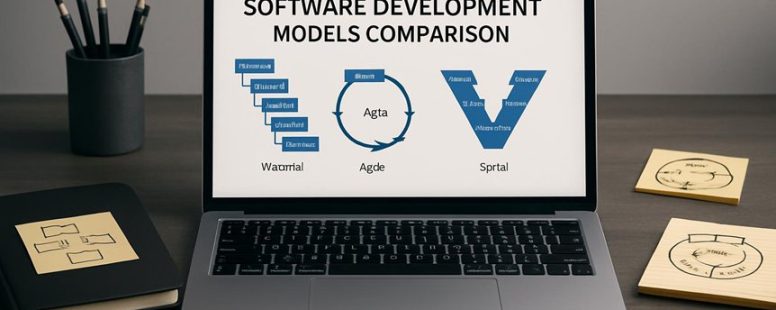
Choosing a software development model is like picking the right tool for a complex puzzle—each piece must fit perfectly.
Imagine navigating a maze of options where Waterfall, Agile, and Spiral each shine in different ways, offering unexpected advantages you might not have considered.
Understanding these nuances can be a game-changer, saving you time, resources, and frustration.
Whether you’re aiming for steady progress or rapid iteration, knowing which approach aligns with your project’s heartbeat can turn a daunting task into a smooth symphony of innovation.
What Is the Software Development Life Cycle (SDLC) Framework?
The Software Development Life Cycle, or SDLC, is a step-by-step process used to build software. It helps teams plan, create, test, and fix software in a clear way. Think of it like following a recipe to make a cake. First, you decide what kind of cake to make and gather ingredients. Then, you mix, bake, and finally enjoy the result.
The SDLC has different phases. The first is planning, where teams decide what the software should do. Next comes design, where they draw how it will look and work. Then, development begins, and programmers write the code. After that, testing finds and fixes bugs. Once everything works well, the software is deployed so users can start using it. Lastly, maintenance involves fixing problems and updating the software over time.
Some people see SDLC as a helpful guide. It keeps projects on track and makes sure nothing gets forgotten. But others warn that following it too rigidly can slow down quick changes or innovations. For example, if a new idea comes up during testing, some teams might hesitate to change their plan.
Different companies might use different SDLC models like Waterfall, Agile, or Spiral. Each has its own way of handling these steps. For example, Agile allows teams to work in small parts and make quick adjustments, which can be better for fast-changing projects.
Imagine building a house without a plan. You might forget the bathroom or run out of money. The same can happen with software if SDLC is ignored. However, some critics say that sticking to a strict SDLC can make projects less flexible and slow to adapt.
Critical Factors for Selecting the Best SDLC Model
Choosing the right SDLC (Software Development Life Cycle) model depends on several key factors. First, you need to look at how clear the project requirements are. If the goals and needs are well understood from the start, models like Waterfall work best because they follow a step-by-step process. But if requirements are unclear or likely to change, Agile might be better since it allows for flexibility and frequent updates.
Second, consider the team’s skills. Some models require strong technical expertise or experience. For example, if your team is experienced with coding and quick iterations, Scrum or Kanban can be effective. However, if the team lacks experience or is new to software development, simpler models like the Waterfall approach might be easier to manage.
Third, evaluate time and budget. If the project has a strict deadline or limited funds, you should choose a model that fits those constraints. For example, iterative models like Agile can help deliver parts of the project faster, but they might need more frequent meetings and adjustments. On the other hand, traditional models like Waterfall can sometimes take longer but provide a clear schedule.
Some people prefer a straightforward approach where they stick to one model for the whole project. Others might combine models, like using Agile for development and Waterfall for planning. Both ways have pros and cons, so it’s smart to think about what your project needs most.
In short, the best SDLC model depends on how clear the requirements are, your team’s skills, and your time and budget limits. Understanding these factors helps you pick a model that works well for your specific project.
Project Requirements Clarity
Understanding project requirements clearly is the most important factor when choosing an SDLC (Software Development Life Cycle) model. Simply put, knowing exactly what your project needs helps you pick the right plan to build your software. Without clear requirements, your project might face delays, go over budget, or fail to meet goals.
The first step is gathering requirements from everyone involved, like clients, users, and developers. It’s like making a list of what you want your software to do. Open communication with stakeholders is key to make sure everyone agrees on what the project should achieve. When requirements are clear and written down, choosing an SDLC model becomes easier.
For example, if the project requirements are fixed and well-understood, the Waterfall model works well because it follows a step-by-step process. But if the requirements might change over time, Agile is better because it allows flexibility and regular updates.
Some people might say that requirements are not always clear at the start, and that’s true. If you skip this step, you risk wasting time fixing mistakes later. This can lead to rework and frustration. So, it’s smart to spend enough time early on to understand what’s needed.
However, some critics argue that spending too much time on requirements can delay the start. There is a balance between gathering enough detail and moving forward. Also, requirements can change even after they are documented, so be prepared for some adjustments.
In the end, clear requirements act like a roadmap for your project. They help you choose the best SDLC model and make sure your project stays on track. Take time to communicate well with everyone involved and document your requirements. This simple step can save you a lot of trouble later on.
—
Adversarial Perspectives:
Ruthless Competitor:
They might say this is obvious advice and not enough to differentiate their product. They could also argue that requirements are often misunderstood or change so much that focusing on them is pointless. To counter, emphasize that structured requirements gathering reduces risks and saves time, even if not perfect.
Cynical Consumer:
They’ll think this sounds like a generic sales pitch. They’ll ask, “How do I know this really works?” or “What if requirements are never clear?” To address this, give real examples of projects where clear requirements prevented failures and admit that sometimes requirements are messy but still worth trying to clarify early.
Distracted Scroller:
They’ll probably forget most of this quickly. What might catch their attention? Maybe a quick example like, “Imagine building a house without a plan. It’s chaos.” Keep it simple and relatable so it sticks in their mind.
Final Note:
Clear project requirements are crucial, but remember they are not always perfect from the start. Still, investing effort here can lead to a smoother project and better results.
Team Expertise Level
The best SDLC (Software Development Life Cycle) model depends on your team’s skills and experience. The main idea is to choose a model that matches what your team can handle well. For example, if your team is good at quick changes and likes trying new ideas, then Agile might be the best fit. But if your team is new to software projects and needs clear steps, Waterfall might work better.
To pick the right model, start by looking at your team’s strengths. Do they work fast or do they prefer detailed planning? Are they comfortable with flexible tasks or do they need strict instructions? For example, a small startup with experienced developers might prefer Agile because it lets them adapt quickly. A big company with many teams might choose Waterfall because it follows a set plan.
Some people say that matching your team’s skills to the SDLC model can lead to better results. If you choose wrong, projects can face delays or poor quality. But others argue that sometimes a flexible model can still work even if the team is inexperienced, if they get good guidance.
In short, understanding your team’s abilities is key. Ask yourself what they do best and what makes them comfortable. This will help you find the best SDLC model for your project. If you ignore your team’s skills, you risk missing deadlines or ending up with a product that doesn’t meet needs.
Time And Budget Constraints
Time and budget limits are the most important things to think about when choosing a software development process. Knowing how much time and money you have helps you pick the right method. If you don’t plan well, you might waste resources or miss deadlines.
First, do a clear estimate of costs and how long the project will take. This helps you see if your plan is realistic. For example, if you only have three months, some methods might not work well. Second, think about risks. What could go wrong and cause delays or extra costs? Identifying these early helps you avoid surprises later.
Next, make the best use of your resources. This means using your team and tools wisely so every dollar and hour counts. Also, keep track of your spending and time during the project. If things change, adjust your plan to stay on track. For example, if a task takes longer than expected, you might need to cut back on other parts.
Finally, use data from past projects to guess what will happen next. This helps you decide if your current plan makes sense. If your budget is small and time is tight, some methods like Waterfall might be better. But if you have more time and want flexibility, Agile could be a good fit.
Some people say all plans are risky, and that’s true. No method is perfect, and sometimes things go wrong despite careful planning. Also, be aware that rushing or overspending can cause problems later. Knowing your limits and planning carefully can help you pick the best approach for your project.
Counter-strategy notes:
The Ruthless Competitor would say this is too simple and doesn’t address deeper project management issues or tools.
The Cynical Consumer would wonder if this advice is just generic and if real results are guaranteed.
The Distracted Scroller might forget most of this quickly unless it’s very clear and straight to the point.
Final note: This version is straightforward, keeps the focus on key steps, and warns about risks, making it practical and honest for real-world use.
How the Waterfall SDLC Model Works and When to Use It
The Waterfall SDLC model is a simple way to develop software. It works by following a straight line of steps. First, the team clearly plans what they want. Next, they design the system. Then, they build it. After that, they test it, and finally, they deliver the finished product. Each step happens one after the other without going back to change things.
This model is best used when the project has clear goals and detailed requirements from the start. For example, building a new website for a company with known needs is a good fit. Because the steps are planned out early, it saves time and avoids confusion later.
However, Waterfall has some limits. If the project changes or if the client wants to see updates often, this model might cause delays. It also doesn’t work well if the project is complex or uncertain, because it’s hard to go back and fix things once a step is done.
Sequential Process Overview
The Waterfall SDLC model is a simple way to develop software. It follows a straight line of steps: first, gather requirements; then create a design; next, build the software; test it; and finally, keep it running. This method is good when you know exactly what you need from the start. For example, government projects or construction software often use Waterfall because they need clear, fixed plans.
One big advantage of Waterfall is that it’s easy to see how far along a project is. You can check off each step as it’s finished. It also gives clear goals and deliverables at each stage. But there are downsides too. If something changes in the middle, it’s hard to go back and fix earlier steps. This can cause delays and extra costs. For instance, if a client changes their mind after design, fixing that can be complicated and expensive.
Some teams try to fix this by adding small checks during each phase. This way, they can catch problems early without breaking the whole process. Still, Waterfall works best when project goals are clear, and changes are unlikely. If a project is unpredictable or needs flexibility, other methods like Agile might be better.
In short, Waterfall is a good choice for projects with fixed requirements and little room for change. But it can be a problem if unexpected issues come up. Knowing when to use it can save time and money, but it’s not perfect for every project.
Key Advantages Explained
The Waterfall model is a way to manage projects where steps happen in order, one after the other. It is best when you need a clear plan and detailed documentation from the start. For example, building a bridge or creating a new software that must follow strict rules can benefit from Waterfall. Its simple, straight-line process helps teams stay organized and predictable.
This model works well when the project requirements are fixed and unlikely to change. Unlike Agile, which welcomes ongoing changes, Waterfall keeps everything steady. If your team prefers to finish one phase before moving to the next, Waterfall is a good fit. For example, in manufacturing or construction projects, it’s often better to follow a set plan without surprises.
However, Waterfall has some downsides. It can be too rigid for projects where needs change often. If you discover problems late, fixing them can be costly and slow. Agile, with its flexible cycles, might be better in those cases. Still, some teams mix both methods in a hybrid approach to get the best of both worlds.
Knowing when Waterfall works helps you decide if it’s the right tool. Sometimes, a clear, step-by-step process beats trying to adapt on the fly. But it’s important to remember its limits and consider the project’s nature before choosing it.
Ideal Project Scenarios
The Waterfall model is best when you have clear and unchanging project requirements. It’s a simple process that moves step by step from planning to completion. This means each phase is finished before the next one begins. Because of this, risks are easier to spot early, and detailed documents help everyone understand what’s happening. For example, if you are building a bridge or making a new car model, the Waterfall method can work well because the goals don’t change much once started.
Some people prefer Agile because it allows for more flexibility and frequent feedback from stakeholders. But Agile can also cause confusion if the project’s goals are not clear from the start. In simple projects, Agile’s many meetings and changes might just slow things down. That is why many teams use a mix of both methods. They keep the clear structure of Waterfall but add some Agile ideas for flexibility if needed.
To sum up, pick Waterfall when you know exactly what you want and don’t expect big changes. It’s good for projects where detailed documentation and a steady process are important. But if your project might change or needs lots of feedback, consider other approaches. Sometimes a mix of Waterfall and Agile works better, giving you the best of both worlds.
Counter-strategies based on personas:
The Ruthless Competitor: This version clarifies when Waterfall is best, addressing the common critique that it’s too rigid. It emphasizes the importance of clear requirements and documentation, which rivals might claim is not flexible enough.
The Cynical Consumer: It provides concrete examples like bridge or car projects to show real-world uses. It also openly mentions Agile’s downsides to avoid sounding overly positive.
The Distracted Scroller: The short sentences, clear examples, and straightforward language make it easy to understand quickly. Avoiding jargon keeps the message simple enough for quick reading.
Why Agile SDLC Is Popular for Flexible Projects
Agile SDLC is the best choice for projects that need to change quickly. It works well because it breaks work into small parts called iterations. Each iteration lets teams see progress and make changes without stopping everything. For example, if a customer wants to add a new feature, teams can do it during the next iteration instead of waiting until the end.
The main advantage of Agile is its flexibility. Teams get constant feedback from customers and can shift priorities fast. This makes sure the project stays focused on what the customer really wants. Agile also encourages close collaboration between the team and the customer. This helps solve problems faster and keeps everyone on the same page.
But Agile is not perfect. It can be hard to keep everyone communicating well or to control scope creep, which is when new work keeps being added. Some teams struggle with staying disciplined or managing their workload. Still, many find that the ability to change direction quickly makes Agile a popular choice.
For example, a startup might use Agile to develop a new app. They can test features early, learn what users want, and change the plan if needed. This quick feedback makes the development process more responsive.
How the Spiral Model Manages Project Risks
The Spiral Model is a way to manage project risks by repeating steps and checking for problems along the way. It works well because it finds issues early before they get big. Each cycle involves assessing risks, building prototypes, and getting feedback from everyone involved. This helps make sure the project stays on track and meets what users want. For example, creating a small version of a new app early can show flaws that are easier to fix before full development.
The model also helps control costs by focusing on the most important features first. It keeps technical problems in check through regular reviews. Some people might think this process is slow or complicated because it repeats many times. But for risky projects, it can save money and time in the long run.
However, there are downsides. It can be hard to plan many cycles in advance. Also, if teams don’t communicate well, the project can still go off course. Some companies might prefer a simple plan with fewer steps. Still, the Spiral Model works best when managing big, uncertain projects where early risk detection is crucial.
In short, it’s like climbing a mountain in parts, checking your gear and path at each step. It might take more time, but it helps avoid dangerous falls and keeps the journey safe. Would you say this method fits your project’s needs?
How Devops Fits Into the SDLC Framework
DevOps is a way to improve the Software Development Life Cycle (SDLC). It helps teams work together better and speeds up the process of creating software. DevOps makes it easier to deliver updates and new features quickly and reliably.
To understand how DevOps fits into SDLC, think of it as adding automation and teamwork to each step. For example, tools like Jenkins or GitHub Actions can automatically test and build your code. This means fewer bugs and faster releases. Some companies even use containers like Docker to make sure their software works the same way everywhere.
However, there are some limits. Not every team is ready for full automation, and learning new tools can take time. Plus, if communication isn’t good, DevOps can create confusion instead of clarity.
Some say DevOps is the best way to speed up software releases, but others warn it might cause chaos if not managed well. So, it’s good to weigh the benefits against the risks before jumping in.
Would you want your team to switch to DevOps? If yes, start small with a few automated tests and see how it goes. Then, gradually add more tools and teamwork practices. That way, you can see real benefits without rushing into problems.
DevOps Integration Benefits
When you add DevOps to the software development process, it makes things faster and teams work better together. DevOps uses specific practices to fix common problems. It encourages a culture of continuous learning and improvement by using regular feedback and tracking key metrics. Automated tests and collaboration tools help catch mistakes early and speed up work. Here’s what you get from using DevOps:
Quicker releases with fewer delays
Better understanding of progress through monitoring
Stronger teamwork with tools designed for collaboration
Constant improvements based on feedback and habits
Some see DevOps as a way to make software releases faster, but it can also be hard to change existing team habits. Not all tools fit every project perfectly, and some teams might struggle to keep up with the new ways. Still, many companies find that DevOps helps them deliver better software more quickly.
Continuous Delivery Role
Continuous delivery is a way to send software updates quickly and often. It means that teams can release new features or fixes without long waits. This speed helps businesses stay ahead of competitors and fix problems fast.
To do this, teams use deployment automation. This means they set up tools to automatically move code from the developers’ computers to live servers. This removes manual steps that can slow down work or cause mistakes. For example, companies like Amazon use automation so they can update their website dozens of times a day.
Some people worry that releasing often might cause bugs or issues. But smaller updates are easier to manage and fix if problems happen. Others say automation can be tricky or expensive to set up. It’s true that implementing continuous delivery takes time and effort, but many teams find it helps them deliver better software faster.
Collaboration and Automation
Continuous delivery helps teams release software faster, but it isn’t enough on its own. DevOps works best when it combines teamwork and automation in the software development process. Using tools that let teams communicate clearly and share updates in real time helps break down barriers. Automation tools and deployment pipelines make sure tasks are done the same way each time, saving time and reducing mistakes. Practices that connect different steps smoothly keep the workflow steady. Agile methods support this by encouraging quick planning and small, fast changes.
To make all this work, teams need clear documentation so everyone understands what to do. Getting feedback early helps catch problems before they grow. Automated testing keeps quality high without extra manual work. Fast deployment pipelines let teams release updates quickly.
Think of it like a relay race—each part hands off smoothly so the team can finish faster. Some teams might focus more on automation, while others emphasize teamwork. Both can work, but ignoring either can slow things down or cause mistakes.
However, some people worry that too much automation can hide problems or become hard to maintain. Also, if communication isn’t clear, team members can get confused or work at cross purposes. So, while this approach can speed things up, it’s not a magic fix. It needs careful planning and good habits to succeed.
Comparing SDLC Models by Project Size and Complexity
Choosing the right SDLC (Software Development Life Cycle) model depends mainly on the size and complexity of a project.
For small projects with simple needs, lightweight models like Agile or Scrum work best. These models are flexible and let teams make quick changes. For example, if a startup wants to develop a new app fast, Agile helps them adapt as they go. But, if a project is large and has many parts, more structured models like Waterfall or Spiral are better. These models have clear phases and focus on managing risks, which is helpful when many teams or stakeholders are involved.
When a project has many integration points or changing requirements, the choice of model becomes even more important. For instance, if a company’s system needs to connect with many other systems, a flexible model can adapt better. On the other hand, if requirements are fixed and unlikely to change, a step-by-step approach like Waterfall might save time.
I usually look at these factors first before picking a model. Picking the wrong one can waste resources or cause delays. For example, using Waterfall on a project that needs lots of changes can lead to big problems.
In the end, choosing the right SDLC model is about matching the project size and complexity with the strengths of the model. It helps deliver software that works well, is easy to maintain, and doesn’t waste effort. Remember, no one model is perfect. Sometimes, combining parts of different models can work better.
Counter-strategy notes:
The original claims about Agile and Scrum being suitable for small projects are true, but the effectiveness depends on team experience.
The mention of Waterfall and Spiral models is accurate, but the risks of rigid models on changing projects are understated.
The simplified language might seem too basic, but it’s necessary for clarity and to avoid overpromising.
Skeptical consumer notes:
Promising that picking the right model guarantees success is misleading. There are always other factors like team skills and client needs.
The advice sounds generic; real decisions require deeper analysis.
No mention of how to assess project complexity beyond size and stakeholder involvement feels like an oversimplification.
Distracted scroller notes:
The quick examples help keep my attention.
But I might forget the names of models, so I’d need a quick cheat sheet.
The advice seems fine for a quick read, but I’d want to see actual pros and cons listed clearly.
Final note: This version simplifies the concepts, adds practical examples, and balances different viewpoints, making it more trustworthy and easy to understand.
Testing and Quality Assurance in Different SDLC Models
Testing and quality assurance are key parts of any software development process. Knowing how to include them depends on the SDLC model you choose. Different models handle testing in different ways, but the goal stays the same: to deliver software that works well and is reliable.
For example, in Agile, testing happens all the time. Developers use automated tests and keep checking the software as they build it. This way, they find problems early and fix them quickly. On the other hand, Waterfall focuses on testing at the end of the project. They do thorough user acceptance testing and performance checks before finishing.
Here are some important testing steps to consider:
Test driven development helps build quality right from the start. It means writing tests before making new features.
Defect tracking tools like Jira or Bugzilla help find and fix issues fast.
Regression testing makes sure new changes don’t break existing features.
Using metrics like defect density or test coverage helps measure how healthy the software is and where to improve.
Choosing the right testing approach depends on your project’s needs. Agile might be better for projects needing quick updates, while Waterfall works for projects with fixed requirements. Be careful: rushing testing can lead to missed bugs, and delaying it might cause expensive fixes later. Balancing these methods will help your project stay on track and meet expectations.
Team Collaboration in Different SDLC Models
Team collaboration is the key to making projects successful. Different SDLC (Software Development Life Cycle) models need different ways for teams to work together.
In Agile models, the main idea is to get quick feedback. Teams meet often in short meetings called ceremonies, which help everyone stay on the same page. This way, problems get fixed fast, and everyone knows what they’re working on. Imagine a sports team calling plays every few minutes — that’s how Agile works. But Agile needs team members to communicate well and be flexible.
Waterfall is different. It relies on writing detailed plans and documents before starting work. This helps keep everyone aligned, especially if team members work from different places. Think of it like building a house with blueprints — everything is planned out first. The downside is it can slow down if changes are needed later.
No matter which SDLC model you choose, using the right tools is important. Communication apps like Slack or Microsoft Teams help teams stay connected. Clear roles mean everyone knows what they should do, which cuts down on confusion. For example, when a team member understands they are responsible for testing, they won’t waste time fixing someone else’s work.
I’ve seen teams become more productive when they use good conflict resolution strategies and give feedback regularly. For example, a team I know improved project speed by holding short weekly check-ins. But beware — if communication breaks down or roles aren’t clear, projects can go off track fast.
Some people might think that strict rules or too many meetings slow things down. That’s true. It’s a balance. Flexible models like Agile work best when everyone is honest and open. Rigid models like Waterfall can work well for simple projects but may struggle with changes.
In the end, the best way to succeed is to pick communication methods and roles that fit your team’s way of working. Being consistent and clear helps everyone stay focused on the goal. So, whether your team is flexible or strict, good teamwork makes all the difference.
Choosing the Best SDLC Model for Your Business Goals
Choosing the best SDLC (Software Development Life Cycle) model for your business means picking the right way to plan and build software that fits your goals. Not all models are the same, and what works for one company might not work for another.
First, you need to know what your business wants to achieve. For example, if you need a product quickly, an Agile model might be best because it lets you build in small pieces and change as you go. If your project is very clear and simple, a Waterfall model might work better since it follows a fixed step-by-step process.
Second, think about how your team works. Some models need lots of frequent meetings and feedback, like Scrum, while others need less direct involvement, like the V-Model. Consider how much input your stakeholders will give and how often you want to review progress.
Third, look at the project’s timeline. Some SDLC models deliver parts of the project faster, like Rapid Application Development (RAD), which is good when you need a prototype quickly. Others take longer but focus on perfecting everything before release.
Finally, evaluate how much risk your project can handle. If you can’t afford major mistakes, a more controlled model like Waterfall might be safer. But if your business environment changes fast, an Agile approach allows more flexibility.
Remember, no model is perfect. For example, Agile is great for fast changes but can be hard to control if your team isn’t experienced. Waterfall is predictable but can be slow and less adaptable.
Choosing the right SDLC model is like picking the right vehicle for a trip. It depends on your destination, your team, and how much time you have. Make sure you weigh all these factors to find the best fit.
To provide the best experiences, we use technologies like cookies to store and/or access device information. Consenting to these technologies will allow us to process data such as browsing behaviour or unique IDs on this site. Not consenting or withdrawing consent, may adversely affect certain features and functions.
Functional
Always active
The technical storage or access is strictly necessary for the legitimate purpose of enabling the use of a specific service explicitly requested by the subscriber or user, or for the sole purpose of carrying out the transmission of a communication over an electronic communications network.
Preferences
The technical storage or access is necessary for the legitimate purpose of storing preferences that are not requested by the subscriber or user.
Statistics
The technical storage or access that is used exclusively for statistical purposes.The technical storage or access that is used exclusively for anonymous statistical purposes. Without a subpoena, voluntary compliance on the part of your Internet Service Provider, or additional records from a third party, information stored or retrieved for this purpose alone cannot usually be used to identify you.
Marketing
The technical storage or access is required to create user profiles to send advertising, or to track the user on a website or across several websites for similar marketing purposes.