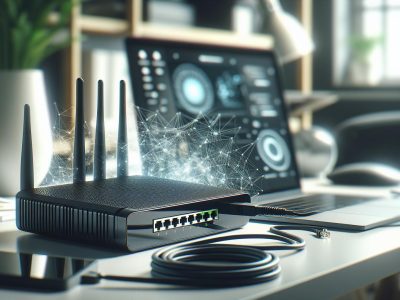
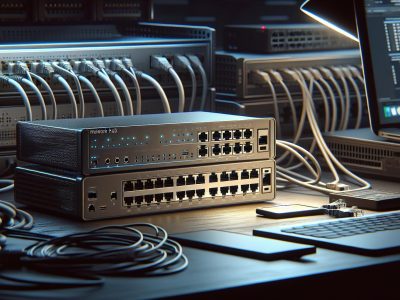
Imagine trying to navigate a bustling city without a map or GPS. Chaos, right? That’s what your network would feel like without the guidance of devices like routers and switches. These two unsung heroes quietly manage the flow of data, ensuring your devices stay connected and your information reaches the right destination. But while they often work together, they serve very distinct purposes.
You might wonder—what sets a router apart from a switch? It’s more than just a technical distinction; understanding their roles can transform how you optimize your home or office network. Whether you’re streaming movies, gaming, or running a business, knowing the difference helps you make smarter decisions about your tech setup. Let’s jump into what makes each device unique and how they work to keep your digital world running smoothly.
What Is a Router?
A router is a networking device that directs data packets between devices in your network and external networks, such as the internet. It connects multiple networks, enabling communication and ensuring data reaches its destination.
Key Features of a Router
IP Address Assignment: Assigns unique IP addresses to devices, ensuring proper identification within a network. For example, your laptop and smartphone each receive distinct addresses.
Network Security: Includes firewalls and encryption protocols to safeguard network data from unauthorized access.
Dual-Band and Tri-Band Support: Operates on multiple frequency bands like 2.4 GHz and 5 GHz, optimizing speed and minimizing interference.
Dynamic Routing: Adjusts data pathways for efficiency using protocols like OSPF or BGP.
How Routers Work
Routers analyze data packets, determine the optimal path, and send them to the intended destination. When browsing a website, your router reads its IP address and sends the relevant data to your device. They use routing tables and algorithms for efficient communication and often incorporate NAT (Network Address Translation) to share a single public IP across devices.
Wireless routers add functionality by creating Wi-Fi networks, providing connectivity without the need for Ethernet cables. Hybrid models combine features like switches and modems for versatile usage.
When to Use a Router
Use a router to connect multiple devices, access the internet, or create a secure local network. They’re essential in setups combining wired and wireless connections, such as homes or offices with desktops, smartphones, and smart TVs.
For instance, routers are vital for smart homes where devices like IoT cameras rely on Wi-Fi connectivity. Similarly, business environments depend on them to ensure stable connections between servers and cloud services.
What Is a Switch?
A switch is a networking device that connects multiple devices on a local area network (LAN). It directs data packets between devices within the network, ensuring efficient communication without involving the internet.
Key Features of a Switch
Port Density: Switches offer multiple Ethernet ports to connect various devices, like computers, printers, or access points, within a network. Some switches support up to 48 ports in enterprise environments.
Data Packet Filtering: They analyze incoming data packets and use MAC (Media Access Control) addresses to forward them to the correct device. This reduces unnecessary data traffic.
Full-Duplex Communication: Switches enable simultaneous two-way communication between network devices, improving speed and efficiency compared to hubs.
VLAN Support: Many switches support Virtual LANs, allowing you to segment a network for enhanced security and organization.
Scalability: Managed switches provide features like Quality of Service (QoS) and port mirroring, which are essential for expanding and monitoring large networks.
How Switches Work
Switches operate at Layer 2 (data link) of the OSI model, primarily using MAC addresses to manage data traffic. When a device sends data, the switch identifies the destination MAC address and forwards the data to the corresponding port. This process minimizes collisions and optimizes bandwidth usage.
For example, in an office setting, a switch can connect an employee’s computer to a printer or a shared server. Managed switches include administrative functionalities, such as assigning priority to specific traffic like video calls.
When to Use a Switch
Use a switch when creating or enhancing a local network. They’re ideal for connecting multiple devices in an office or home LAN to share resources like printers or files. In environments like small businesses, switches improve performance by segmenting traffic and reducing bottlenecks.
For scenarios requiring internet access, switches connect to a router, allowing devices on the LAN to communicate with external networks. Use unmanaged switches for basic connectivity and managed switches for advanced control in professional setups.
Key Differences Between Router and Switch
Understanding the core differences between routers and switches ensures you select the right device for your networking needs, enhancing both performance and connectivity.
Functionality Comparison
Routers connect multiple networks, directing data packets between them and enabling internet access. They operate at Layer 3 of the OSI model, using IP addresses to forward packets. For example, when you stream video, the router determines the best route to fetch data from a server.
Switches, on the other hand, connect devices within a single local area network (LAN). Functioning at Layer 2, they use MAC addresses to help communication between devices like computers, printers, and servers. A switch in your office, for instance, allows seamless sharing of files between employees’ computers.
Performance and Speed Factors
Routers handle both internal traffic and external connections, which might limit speed as more devices share the bandwidth. Advanced routers with dual-band or tri-band Wi-Fi alleviate this by segregating devices across frequencies, minimizing congestion. An example is a gaming router prioritizing data packets to ensure low latency for online gaming sessions.
Switches deliver higher speeds within a LAN since they focus solely on internal data transfers. With features like full-duplex communication, switches maintain high-speed interactions without collisions. For instance, file transfers between devices in a LAN via a switch are faster compared to routing traffic externally.
Cost and Use Case Scenarios
Routers are costlier than switches, with prices ranging from $50 for basic models to over $300 for advanced ones. This investment is justified for homes or businesses requiring internet access, network security, and smart device connectivity. If you’re setting up a home network for Wi-Fi or IoT devices, a router is essential.
Switches are more affordable, with unmanaged models starting at $20. These are ideal for small networks, such as connecting multiple devices in a single room. Managed switches, priced higher, offer advanced features like VLANs and are suited for enterprise environments needing network segmentation.
The choice hinges on your network’s scale and complexity—routers manage broader connectivity, while switches enhance localized communication.
Choosing Between Router and Switch for Your Network
Understanding when to use a router or a switch improves network efficiency. Each device serves different purposes depending on your setup and connectivity needs.
Factors to Consider
1. Purpose of Your Network
Use a router if your network requires internet access alongside internal communication. For instance, in a home with smart devices like thermostats and speakers, routers help internet connections and secure traffic. Switches suit local environments where devices, such as printers or PCs within a specific network, exchange data without needing internet.
2. Number of Devices
Switches offer high port counts, advantageous for environments with 10+ interconnected devices like offices. Routers typically have fewer ports but support wireless connections for laptops, phones, and tablets. Analyze whether more devices demand wired efficiency or Wi-Fi flexibility.
3. Scalability
Routers provide limited port expansion but support switches for growth. Consider a managed switch when scaling a LAN in a business setting with multiple departments. Switches allow VLAN configuration, ideal for segmenting network traffic by departments or functions.
4. Budget Constraints
Routers generally cost more due to additional features like integrated modems and firewalls. For basic setups, start with an unmanaged switch for affordability. Invest in advanced devices like managed switches or dual-band routers only if required by your network’s scale or functionality demands.
Common Network Configurations
1. Home Networks
Home networks often rely on routers connecting devices to the internet. If more wired ports are needed, combine a switch with your router. This works effectively in gaming setups, where consoles and PCs require stable connections.
2. Small Offices
In small offices, connect switches to routers to extend wired ports for staff laptops or IP phones. Managed switches optimize setups with controlled data routes and secured VLANs for sensitive information.
3. Larger Enterprises
Enterprises use multiple switches linked to backbone routers. Managed switches allocate bandwidth and ensure data prioritization for video conferencing tools or CRM systems. Redundant networks, built via switches, enhance reliability and reduce downtime.
4. Mixed Use Scenarios
Hybrid configurations occur in homes running both work and personal devices. For example, a remote worker may plug their desktop into a switch for reliable video calls and connect streaming devices to the Wi-Fi router.
Choose based on connectivity needs and expandability. Evaluate current usage, potential for growth, and device count before deciding.
Conclusion
Understanding the difference between routers and switches is crucial for building an efficient and reliable network. Each device plays a unique role in managing data flow and connectivity, whether you’re setting up a simple home network or a complex office system.
By evaluating your specific needs, such as the number of devices, internet requirements, and future scalability, you can determine which device—or combination of both—fits your setup best. With the right choice, you’ll ensure seamless communication, optimal performance, and a network that meets your demands.
Published: July 25, 2025 at 9:16 am by Ellie B, Site owner & Publisher
To provide the best experiences, we use technologies like cookies to store and/or access device information. Consenting to these technologies will allow us to process data such as browsing behaviour or unique IDs on this site. Not consenting or withdrawing consent, may adversely affect certain features and functions.
Functional
Always active
The technical storage or access is strictly necessary for the legitimate purpose of enabling the use of a specific service explicitly requested by the subscriber or user, or for the sole purpose of carrying out the transmission of a communication over an electronic communications network.
Preferences
The technical storage or access is necessary for the legitimate purpose of storing preferences that are not requested by the subscriber or user.
Statistics
The technical storage or access that is used exclusively for statistical purposes.The technical storage or access that is used exclusively for anonymous statistical purposes. Without a subpoena, voluntary compliance on the part of your Internet Service Provider, or additional records from a third party, information stored or retrieved for this purpose alone cannot usually be used to identify you.
Marketing
The technical storage or access is required to create user profiles to send advertising, or to track the user on a website or across several websites for similar marketing purposes.