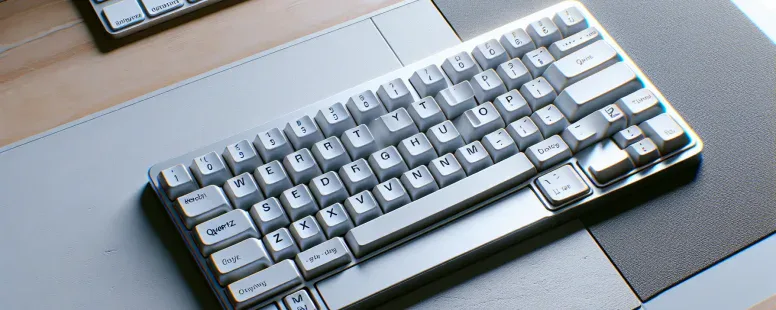
Picture this: you’re typing away on a keyboard, your fingers gliding effortlessly across the familiar layout. But suddenly, something feels off—letters aren’t where they should be. Could it be a typo? Or maybe… it’s not the QWERTY keyboard you’ve grown up with but its lesser-known cousin, QWERTZ.
Overview Of Keyboard Layouts
Keyboard layouts determine the arrangement of keys on your keyboard and directly affect typing efficiency. The two most prominent variations, QWERTY and QWERTZ, cater to different linguistic and regional needs.
QWERTY is widely used in English-speaking countries like the US, Canada, and Australia. Its layout prioritizes letter combinations common in English; for example, “TH” or “ER.” This design stems from mechanical typewriters where key placement minimized jamming.
QWERTZ serves German-speaking regions such as Germany, Austria, and Switzerland. It replaces the “Y” key with “Z” due to the higher frequency of “Z” in German texts. Also, special characters like umlauts (ä, ö, ü) are more accessible to accommodate language-specific symbols.
Both layouts share core similarities but differ significantly in utility based on language requirements. For instance: QWERTY’s structure facilitates English fluency while limiting adaptability to languages needing accented vowels or unique consonants.
Understanding these distinctions helps you choose a layout aligned with your linguistic preferences or geographical region.
What Is The QWERTY Layout?
The QWERTY layout is the most widely used keyboard design globally, especially in English-speaking regions. Its configuration prioritizes ease of typing common letter combinations in the English language.
History And Origin
The QWERTY layout originated in 1873 and was developed by Christopher Latham Sholes, one of the inventors of the typewriter. It became standard when Remington adopted it for their first commercially successful typewriter model. The arrangement aimed to reduce mechanical jams by spacing frequently paired letters apart during typewriter use.
Its name comes from the first six keys on the top-left row: Q, W, E, R, T, and Y. Over time, this layout gained dominance due to widespread adoption rather than inherent efficiency. Although initially designed for mechanical machines, its influence persists even in digital keyboards.
Key Features And Use
The QWERTY layout organizes keys based on letter frequencies and typing patterns in English. Commonly used letters like A and E are positioned centrally for quicker access while less frequent ones like Z and X are placed towards the edges.
This design suits languages with Latin alphabets but may not align perfectly with non-English linguistic needs. For example, typists using German or French often face difficulties accessing special characters efficiently without modifications or alternative layouts like AZERTY or QWERTZ.
QWERTY remains dominant across devices such as PCs, laptops, tablets, and smartphones due to familiarity and global standardization even though critiques about its ergonomic limitations compared to newer designs like Dvorak or Colemak layouts.
What Is The QWERTZ Layout?
The QWERTZ layout is a keyboard design primarily used in German-speaking countries. It’s similar to QWERTY but includes changes that better align with the German language and typographic needs.
History And Origin
The QWERTZ layout originated in Europe to accommodate languages like German, Hungarian, and Czech. Its creation addressed linguistic challenges where “Z” appears more frequently than “Y.” Unlike QWERTY, which was designed for typewriters in English-speaking regions, QWERTZ catered specifically to regional writing systems and special characters. For example, umlauts (ä, ö, ü) are prominently placed for ease of access on these keyboards.
QWERTZ became standard across Germany and Austria during the 20th century as typewriters and computers spread throughout these regions. This adoption cemented its role as the go-to format for professional typists and casual users alike in those areas.
Key Features And Use
The most noticeable difference between QWERTY and QWERTZ is the swapped positions of “Y” and “Z,” reflecting their frequency differences in German texts. Also, keys for symbols like ß (Eszett) or § (section sign) are included to support proper documentation within the language’s context.
This layout also prioritizes easy access to accented vowels such as ä, ö, ü by assigning them dedicated positions or combinations with modifier keys like AltGr. In multilingual contexts where both Latin-based alphabets and unique diacritics coexist—like Swiss-German—the keyboard allows seamless switching without external tools.
Professionals like writers or editors working with German documents benefit from this arrangement since it minimizes interruptions caused by frequent symbol searches. But, transitioning from one layout to another demands practice due too muscle memory differences developed over time on previous keyboards.
Key Differences Between QWERTY And QWERTZ
QWERTY and QWERTZ keyboards differ in layout, regional usage, and typing functionality. Understanding these distinctions helps you select the most suitable option for your language or location.
Placement Of Letters
The primary difference lies in the placement of “Y” and “Z.” On a QWERTY keyboard, “Y” is positioned between “T” and “U,” while on a QWERTZ layout, it’s replaced by “Z.” This change reflects the higher frequency of “Z” in German words. For instance, words like Zimmer (room) or Zeit (time) benefit from this adjustment.
Special characters also vary. Umlauts (ä, ö, ü) are easily accessible on QWERTZ layouts but require combinations on QWERTY. Also, symbols like ß (Eszett) have dedicated keys in QWERTZ to support proper German writing conventions.
Regional Preferences
QWERTY dominates English-speaking regions such as the US, Canada, and the UK due to its adaptability for English phonetics and letter patterns. In contrast, countries like Germany, Austria, Switzerland use QWERTZ because it aligns with their linguistic needs. Swiss keyboards even include French accents alongside umlauts to accommodate multilingual users.
These preferences aren’t rigid; international users often switch layouts based on professional needs or personal convenience. But adapting requires practice if you’re used to one format over another.
Typing Experience
Typing feels different depending on layout familiarity. With frequent letters placed conveniently—such as “E” in both systems—typing speed can improve over time within each setup’s context. Yet transitioning between them might slow down your performance initially since muscle memory gets disrupted.
For example: If you’ve typed years-long using a US keyboard switching suddenly into German causes errors when reaching for misplaced keys like Y/Z or accented vowels not present before-hand!
Pros And Cons Of Each Layout
Understanding the advantages and disadvantages of QWERTY and QWERTZ helps you choose the layout that fits your typing needs. Each has strengths tailored to specific languages and contexts.
Pros And Cons Of QWERTY
QWERTY is globally recognized, making it convenient for international use. Its widespread adoption across devices ensures compatibility with software, operating systems, and shared workspaces. The layout’s design prioritizes common English letter combinations like “th” or “he,” aiding speed for native speakers.
But, its inefficiency in non-English contexts can hinder productivity. For example, accessing accented characters or diacritical marks often requires multiple keystrokes on QWERTY keyboards. The lack of ergonomic optimization may also lead to discomfort during extended typing sessions.
Pros And Cons Of QWERTZ
QWERTZ excels in supporting Germanic languages by positioning frequently used letters like “Z” prominently. It includes dedicated keys for umlauts (ä, ö, ü) and symbols like ß, streamlining documentation in German-speaking regions. This layout is ideal if you’re multilingual or primarily type in Central European languages.
On the downside, transitioning from QWERTY to QWERTZ disrupts established muscle memory due to key placement differences between layouts—for instance swapping the positions of “Y” and “Z.” Compatibility issues may arise when using non-QWERTZ systems internationally since not all applications support its unique key mapping without adjustments.
Which Layout Is Best For You?
Your choice between QWERTY and QWERTZ depends on your language, typing habits, and regional preferences. If you’re an English speaker or work in environments dominated by English-based systems, the QWERTY layout offers seamless compatibility with software, hardware, and international devices. It’s also widely recognized in professional settings worldwide.
For those who frequently type in Germanic languages like German or Hungarian, QWERTZ provides a tailored solution. Its placement of “Z” instead of “Y” aligns better with linguistic needs and includes dedicated keys for umlauts (ä, ö, ü) and symbols like ß. These features enhance efficiency when composing texts that require special characters unique to these languages.
Multilingual users may benefit more from QWERTZ if their primary focus is Germanic languages; but, switching between layouts can create challenges due to ingrained muscle memory. Practicing regularly on the new layout reduces this adjustment period over time.
Consider your daily typing tasks before deciding which keyboard suits you best. Do most of your documents include non-English characters? Are you comfortable adapting to a less familiar setup for improved functionality in specific contexts? Answering these questions ensures that your chosen layout meets both immediate and long-term needs effectively.
Conclusion
Choosing between QWERTY and QWERTZ eventually depends on your language needs and typing habits. If you’re primarily working in English or using devices in English-speaking regions, QWERTY’s widespread compatibility offers convenience. On the other hand, if Germanic languages are part of your daily workflow, QWERTZ provides tailored advantages with its accessible umlauts and symbol placements.
Adapting to a new layout takes time and practice, but understanding your specific requirements can make the transition smoother. Whether you stick with familiarity or explore a layout that better suits your linguistic preferences, selecting the right keyboard enhances both efficiency and comfort.
To provide the best experiences, we use technologies like cookies to store and/or access device information. Consenting to these technologies will allow us to process data such as browsing behaviour or unique IDs on this site. Not consenting or withdrawing consent, may adversely affect certain features and functions.
Functional
Always active
The technical storage or access is strictly necessary for the legitimate purpose of enabling the use of a specific service explicitly requested by the subscriber or user, or for the sole purpose of carrying out the transmission of a communication over an electronic communications network.
Preferences
The technical storage or access is necessary for the legitimate purpose of storing preferences that are not requested by the subscriber or user.
Statistics
The technical storage or access that is used exclusively for statistical purposes.The technical storage or access that is used exclusively for anonymous statistical purposes. Without a subpoena, voluntary compliance on the part of your Internet Service Provider, or additional records from a third party, information stored or retrieved for this purpose alone cannot usually be used to identify you.
Marketing
The technical storage or access is required to create user profiles to send advertising, or to track the user on a website or across several websites for similar marketing purposes.