Picture this: you press the power button and your computer springs to life in a heartbeat or lingers in a slow dance of whirring and clicking. What’s lurking beneath the surface that makes such a difference? The answer lies in the heart of your machine—the storage drive.
Choosing between a hard disk drive and a solid state drive isn’t just about speed. It’s about how you interact with your digital world every single day. Maybe you crave the lightning-fast silence of a solid state drive or find comfort in the familiar hum of a trusty hard disk. The real surprise? These drives offer more than meets the eye, from energy savings to durability you can feel in your fingertips. As you weigh your options, you’ll discover that the right choice could transform not just your device but your whole computing experience.
Overview of Data Storage Devices
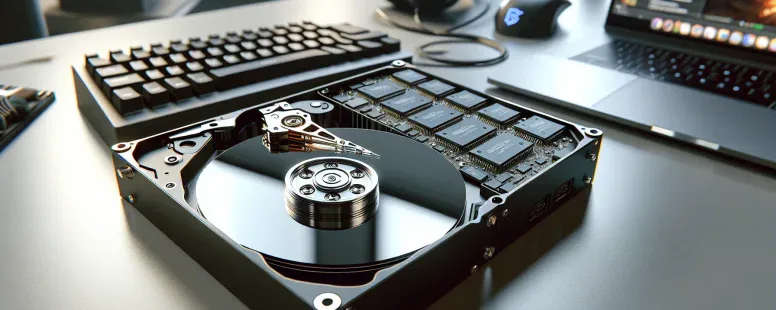
Data storage devices, like HDDs and SSDs, form the backbone of how you keep photos, music, and files alive on your computer. Picture opening a digital diary and finding every childhood photo right where you left it—data storage lets you do just that. HDDs use spinning platters and magnetic heads, a bit like a record player, the arm swooping across to find the right song. SSDs, in contrast, use interconnected flash memory chips, instantly retrieving your favorite files without any moving parts, like a magician pulling a card from thin air.
Ask yourself: why do some laptops wake up in a blink while others seem to crawl from sleep? That’s often the drive at work. HDDs, around since the 1950s, have evolved, but their moving parts can make you hear faint whirring from inside, especially during a big backup. SSDs, built on solid-state semiconductor technology, don’t whisper or hum—they’re silent, resilient to drops, and incredibly fast. According to Statista (2023), SSDs made up more than 60% of new laptop storage, a major shift from just a few years ago.
Ever wonder why gamers debate load times or why photographers fret about data loss? Storage impacts performance, reliability, even your peace of mind. Enterprise cloud providers, like Google Cloud and AWS, stack racks with both SSDs and high-capacity HDDs, using each for what they do best. SSDs run high-speed databases, while massive HDD arrays archive petabytes of backup data.
Some folks recall swapping old HDDs, hearing the satisfying click as the drive locked into place. Migrating to an SSD? It’s like taking off a heavy backpack—you notice the difference with every reboot, every file transfer. So, when you’re picking a storage device, you’re not just choosing capacity. You’re setting the pace of your digital life. With technology evolving quickly, today’s drives have to balance speed, endurance, and value in ways that would’ve seemed impossible a decade ago.
What Is a Hard Disk Drive (HDD)?
Think about every old family photo, that epic music playlist or a garage full of digital projects packed into a spinning, whirring slice of metal called a hard disk drive (HDD). This classic storage hero uses moving parts—like a tiny record player inside your device—to stash your life’s bits and bytes.
How HDDs Work
HDDs store data on spinning platters coated with magnetic material. As each platter rotates, an actuator arm floats millimeters above the surface, reading and writing data through a magnetic head. This mechanical ballet lets your computer pull up a decade-old essay or tuck away 4K videos without skipping a beat.
Seagate’s Barracuda HDD, for example, can spin at 7,200 rotations per minute (RPM), meaning it accesses data quickly—by mechanical standards. The disk speed controls how fast your photos load, your games launch, and your videos play. When you select an HDD, you’re choosing a storage method that’s time tested; the same core technology’s powered desktop computers from IBM in the 1950s right up to mainstream PCs today.
Ever drop a laptop? If that platters are spinning, there’s risk—delicate moving parts can misalign, and like a scratched vinyl record, your files might be lost forever. This mechanical element makes HDDs uniquely vulnerable compared to their flash-based cousins.
Key Features of HDDs
Capacity: You’ll find consumer HDDs from 500GB up to 20TB (Western Digital offers models like Ultrastar DC HC650 which holds up to 20TB). For data hoarders, cloud backup purveyors, and photo archivists, this means plenty of room.
Affordability: HDDs typically cost less per gigabyte than SSDs. For example, in 2023, bulk storage prices hover near $0.03/GB for HDDs (Backblaze, 2023 data), compared to $0.07/GB for SSDs.
Performance: Mechanical movement limits speed. Everyday tasks feel fine, but data-intensive gaming or editing slows things down. Most 7200 RPM drives can manage 80-160MB/s data transfer— SSDs run circles around that.
Longevity and Reliability: HDDs last years, but they wear over time as parts move. That’s why so many IT pros recommend regular backups, especially if your desktop’s fans sound like a jet engine.
Compatibility: Having been around for decades, HDDs work with most desktops, laptops, network attached storage (NAS), and DVRs, so you probably own or used one without knowing it.
Do you remember the first time you heard an old PC’s ticking sound as it searched for a file? Those clicks told a story of physical effort, every byte retrieved by spinning disks and mechanical arms—a reminder of both the beauty and the limitations of traditional storage.
What Is a Solid State Drive (SSD)?
Solid State Drives—or SSDs—store your digital life without spinning disks or humming motors. You probably notice the instant-on feeling when you boot up a sleek new laptop, and that’s the SSD silently at work. Can you picture storing your vacation photos or your latest project files at light-speed? SSDs turn that daydream into everyday reality.
How SSDs Work
Solid State Drives operate using interconnected NAND flash memory chips, bypassing all the spinning platters and read heads typical of Hard Disk Drives. Data travels through integrated circuits, traversing cells and gate layers at near-instantaneous speeds. There ain’t any physical delays, so your files seem to appear at the speed of thought. Tech giants like Samsung and Intel use multi-layered memory cells, some stack 64 or more vertically, to multiply capacity inside a chip smaller than a credit card. why your phone’s storage barely lags, even after years of use? That’s flash memory in action, working tirelessly without wear and tear from moving parts. You could drop a laptop with an SSD onto the sidewalk, and unless the board itself cracks, your data likely stays safe—no spinning disk to shatter.
Key Features of SSDs
Solid State Drives stand out for speed, resilience, and silence. Boot times shrink from minutes to seconds—Windows 11 can load fresh in under 10 seconds (Tom’s Hardware, 2023)—because SSDs skip the seek time dance that slows hard disks. Even massive video games, Adobe projects, and 4K footage open nearly instantly. SSDs make laptops almost weightless, cutting ounces and battery drain by using less energy. According to Crucial, SSDs consume up to 80% less power than HDDs, so your ultrabook lasts longer per charge. Since SSDs have no moving pieces, physical shocks barely phase them—NASA outfits satellites with flash-based memory so vibrations, cosmic radiation, and tumbling in orbit don’t corrupt data. Think back: Have you ever heard an SSD whir or click? They’re silent, cool-running, and immune to daily bumps. You might pay more per gigabyte, but many find that price a fair trade for lightning-fast access, whisper-quiet operation, and rugged longevity.
Main Differences Between Hard Disk Drive and Solid State Drive
Comparing HDDs and SSDs, you’ll see differences that affect everything from startup times to energy bills. Every factor, from speed to sound, makes its mark in daily computing.
Speed and Performance
Speed changes the rhythm of your workday, SSDs load Windows 10 in under 15 seconds, yet, HDDs might take a minute or more. Gamers experience faster level loading with SSDs; photographers find batch editing smoother. Sequential read speeds for SSDs reach 3500 MB/s in NVMe models, but HDDs rarely exceeds 200 MB/s. Picture editing a 4K video project—SSD users zip through rendering, while HDDs spin and lag. Real-world tests from Tom’s Hardware show a Photoshop filter runs nearly 4x faster on an SSD. If quick boots and launches matter, SSD technology makes the difference.
Durability and Reliability
Reliability matters when life gets unpredictable. SSDs handle drops—they’ve no moving parts, so a bump during travel doesn’t spell doom for your data. In contrast, a fall often means an HDD’s spindle or read/write heads get damaged, potentially resulting in corrupted files or complete failure. Enterprise datacenters trust SSDs for mission-critical workloads: their mean time between failure (MTBF) often exceeds 2 million hours, unlike HDDs that hover around 1 million hours (Backblaze, 2023). Still, SSDs have a finite number of write cycles; heavy database users keep this in mind. For most people, SSD resilience offers peace of mind for portable devices.
Capacity and Cost
Capacity questions often steer choices, so do budgets. High-end HDDs offer up to 20TB, storing years of raw footage, game libraries, or comprehensive backups. Bulk storage on SSDs remains expensive, with 4TB SSDs costing over 4x more per gigabyte than comparable HDDs (Statista, 2024). Students stretch their dollar with a 2TB HDD for less than the price of a 500GB SSD. So, for large archives—photos, music, research datasets—HDDs still dominates the value game. If you value speed for your primary drive and massive storage for backups, pairing both options can work smartly.
Noise and Power Consumption
Power and sound shape subtle experiences, especially in laptops and offices. SSDs run silent and cool no matter how many files you open. Laptops with SSDs boast battery lives up to 30% longer than those with HDDs (PCMag testing, 2023). In contrast, HDDs hum and click, especially during heavy use; their spinning platters generate heat and noise, easily noticed in quiet rooms. Cloud server farms adopt SSDs to cut energy bills and lower cooling needs. For silence and efficiency, SSDs change the character of your workspace. If you’re building a media center or a travel laptop, you’d delight in the hush and lower power draw of SSD storage.
Which Is Better for You?
Which storage drive works for you links directly to your habits and needs. Think about speed, cost, noise, and lifespan because each option changes how you interact with your system every day.
Choosing for Everyday Use
Solid state drives (SSDs) favor quick, quiet everyday experiences. When you open your laptop at a coffee shop, SSDs boot in 12 seconds or less, compared with up to 50 seconds on hard disk drives (HDDs), according to a PCMag test (2023). Less waiting means you spend more time browsing, streaming, and editing documents. SSDs also run silently so, you’re not hearing any whir from spinning platters while video-chatting or working late.
Hard disk drives (HDDs) offer larger capacity for the dollar, from 1TB up to 20TB, appealing if your routine involves storing thousands of family photos or decades of music. Some users adapt by keeping everything on a massive HDD, others by splitting files between a small SSD for speed and a large HDD for archives. If your device might get dropped or moved often, like in backpacks or crowded commutes, SSDs provide higher shock-resistance due to the lack of moving parts—your school notes or tax files stay safer. HDDs, on the other hand, often fail when jostled.
Ask yourself: Does fast startup for email and web browsing—or extra storage for media—matter most? Your answer directs the right choice.
Choosing for Gaming or Professional Work
Gaming and professional work demand quick access to files, consistent speed, and reliability under pressure. SSDs enhance gaming by slashing game load times from about 40 seconds on HDDs to roughly 10 seconds on SSDs, based on hardware tests by Tom’s Hardware (2024). Video editors, designers, and engineers move large files regularly; SSDs process high-res footage and massive databases in seconds instead of minutes.
Gamers storing huge game libraries sometimes opt for a hybrid: a 1TB SSD for favorites, plus a 4TB HDD for less-played titles. If your creative projects include 4K video editing, you’ll see stutter-free playback and faster rendering using SSDs, which helps meet tight deadlines.
But, price-conscious users may stick with higher-capacity HDDs for archives, backup, and rarely-used resources. Studios with tight budgets sometimes build networks mixing SSDs for active projects and big HDD arrays for storage.
Consider what loads you throw at your storage—ultra-fast access for gaming and creative work tips toward SSDs, while vast static archives likely suit large HDDs best.
Conclusion
Choosing between an HDD and an SSD comes down to understanding what matters most in your daily digital life. Whether you value speed, storage space, or cost-effectiveness, your decision will shape how you interact with your computer.
Take a moment to think about your priorities and how you use your device. The right storage solution can streamline your workflow, protect your data, and give you a smoother, more reliable computing experience. Make your choice with confidence, knowing it’ll support your needs now and into the future.
To provide the best experiences, we use technologies like cookies to store and/or access device information. Consenting to these technologies will allow us to process data such as browsing behaviour or unique IDs on this site. Not consenting or withdrawing consent, may adversely affect certain features and functions.
Functional
Always active
The technical storage or access is strictly necessary for the legitimate purpose of enabling the use of a specific service explicitly requested by the subscriber or user, or for the sole purpose of carrying out the transmission of a communication over an electronic communications network.
Preferences
The technical storage or access is necessary for the legitimate purpose of storing preferences that are not requested by the subscriber or user.
Statistics
The technical storage or access that is used exclusively for statistical purposes.The technical storage or access that is used exclusively for anonymous statistical purposes. Without a subpoena, voluntary compliance on the part of your Internet Service Provider, or additional records from a third party, information stored or retrieved for this purpose alone cannot usually be used to identify you.
Marketing
The technical storage or access is required to create user profiles to send advertising, or to track the user on a website or across several websites for similar marketing purposes.