Chromecast and Fire Stick might look like twins at first glance—both promise endless streaming options and effortless access to your favorite shows. But peel back the surface, and you’ll find subtle differences that can transform your entire viewing experience.
Imagine choosing between a sleek, intuitive navigator and a device that seamlessly integrates with a broader digital universe. One surprising benefit often overlooked is how Chromecast’s screen mirroring can turn any TV into a smart hub for your gadgets.
These small distinctions can be the key to unlocking a smoother, more personalized entertainment setup—making the choice more significant than it seems.
Which Streaming Device Is Right for You?
The best streaming device depends on what features matter most to you. If you want easy voice control, both Chromecast and Fire Stick can help. Chromecast lets you control what you watch using your phone or tablet, which is simple if you like using your device to cast shows. Fire Stick also offers voice control but has strong parental controls, making it a good choice if you have kids or want to limit certain shows.
Think about how you plan to use your device. If you prefer a hands-free experience and want to control everything with your voice, Fire Stick might be better. But if you like casting from your phone and want a simple setup, Chromecast could be a better fit. Both have their strengths and limitations, so consider what features you use the most daily.
Design and Setup: What You Need to Know
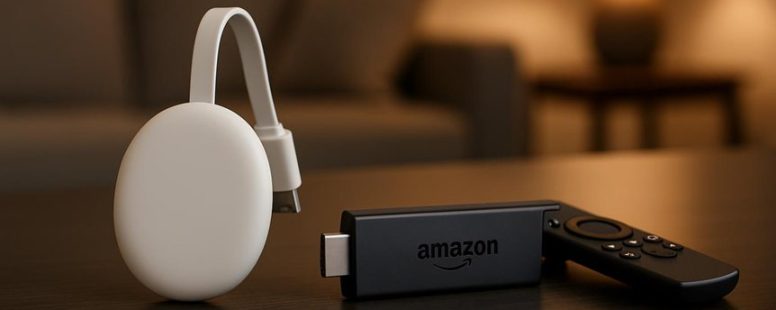
Chromecast and Fire Stick are two popular options for streaming devices, but they work quite differently. Chromecast is a small, simple device that looks like a USB drive. It is easy to hide behind your TV because of its tiny size. Setup with Chromecast is straightforward. You just plug it into your TV’s HDMI port, connect it to your Wi-Fi using your phone, and open the Google Home app to finish setting it up. Many people find this process quick and simple.
Fire Stick has a different look. It is a small, rectangular device that comes with a remote. Its design makes it easy to find and use. To set up the Fire Stick, you plug it into your TV’s HDMI port, connect it to power, and follow the on-screen instructions using the remote. This setup process is also simple, but some users might prefer the remote for faster control.
Both devices are made for easy setup, but their designs appeal to different tastes. Chromecast is good if you want a minimal device that stays out of sight. Fire Stick is better if you want a device with a remote for easier navigation. Just remember, Chromecast relies more on your phone to control everything, while Fire Stick offers a remote for more direct control.
Choosing between them depends on your preference for looks and how you like to control your streaming.
Performance and Streaming Quality: How Do Chromecast and Fire Stick Compare?
Chromecast and Fire Stick are popular devices for streaming shows and movies. The main difference is how they handle picture quality, buffering, and connection speed.
Chromecast is known for its ability to cast content directly from your phone or tablet. It often gives clear picture quality and loads videos quickly if your Wi-Fi is fast. However, because it depends on your phone to control it, delays can happen if your device is busy or if Wi-Fi is slow.
Fire Stick, made by Amazon, connects directly to your TV and has its own remote. It usually streams in high resolution, like 4K, and can handle buffering better. Some users say Fire Stick loads videos faster and keeps the picture steady. But, it might need more storage space and can sometimes freeze if your internet isn’t strong enough.
Both devices have their good and bad sides. If you want a simple way to cast from your phone, Chromecast is a good choice. If you prefer a device with its own remote and better buffering, Fire Stick might be better.
Keep in mind, your internet speed can make a big difference. If Wi-Fi is slow, both devices might struggle with buffering or lower picture quality. So, think about your internet and what features matter most to you before choosing between Chromecast and Fire Stick.
Streaming Resolution Capabilities
Chromecast and Fire Stick are popular devices for streaming videos, but they handle resolution differently. To understand which one is better for high-quality picture, it helps to look at how they process video quality and performance.
Chromecast supports up to 4K Ultra HD with HDR. This means it can show very sharp and colorful images, especially when you mirror your screen or stream content. It uses efficient video codecs that help deliver clear and vibrant visuals. If you want bright colors and deep blacks, Chromecast can do that well. But it is important to have a good internet connection to get the best picture quality.
Fire Stick also supports 4K with HDR and Dolby Vision, depending on the model. These features add more color and contrast, making the picture look more realistic. Fire Stick’s processing power varies by model, so some may handle 4K better than others. For example, the Fire TV Stick 4K offers smooth playback and bright images, but cheaper models might not support all these features as well.
The main difference between them is how well they process video codecs. Chromecast is known for quick and clear streaming, but it may use more bandwidth. Fire Stick can sometimes handle 4K more efficiently, especially in newer models. However, both devices can give you crisp visuals and smooth playback if your internet is fast and stable.
If you love watching movies with lots of colors and details, these devices can both do a good job. Just remember that your internet speed and the device model will affect how good the picture looks. For example, if your internet is slow, you may notice pixelation or buffering, no matter which device you pick.
Buffering and Load Times
Buffering and load times are key factors that affect how well you can stream shows and movies. Chromecast and Fire Stick handle these issues differently.
Chromecast usually streams smoothly with little buffering, especially if your Wi-Fi is strong. It loads content quickly, so you don’t have to wait long to start watching. For example, I’ve noticed that Chromecast gets me into my favorite shows faster, making it more reliable when I want to watch without interruptions.
Fire Stick, on the other hand, sometimes buffers for a few seconds, especially when watching high-definition videos or if the internet is crowded. It may also take a little longer to load apps or switch between different shows or movies. This can be a bit frustrating if you are in a hurry.
Connectivity Stability
Connectivity stability is key to a good streaming experience. If your Wi-Fi connection is weak or has interference, your shows can buffer, or the picture quality can drop. Both Chromecast and Fire Stick depend on your Wi-Fi, so a weak signal can make watching frustrating. Even a small disruption can ruin your enjoyment, especially during high-definition videos.
Here are some important points to keep in mind:
A strong Wi-Fi signal makes streaming smoother.
Interference from other devices can cause connection problems.
Where you place your device affects its connection.
Upgrading to a better router can help improve stability.
Fast and consistent internet speeds are needed for uninterrupted streaming.
Some people find that Chromecast works better with a strong Wi-Fi signal, while others notice Fire Stick drops more often if Wi-Fi is weak. It’s good to check your internet speed and signal strength before choosing a device.
If your Wi-Fi keeps dropping, try moving your router closer or turning off other devices that might cause interference. Using a wired connection with an Ethernet adapter can also make a difference. But keep in mind, even with the best setup, internet issues can still happen sometimes.
In the end, a device that connects reliably makes your streaming more enjoyable. Without a steady connection, it’s hard to watch your favorite shows without interruptions.
User Interface and Content Navigation: Which Is Easier to Use?
The Fire Stick is generally easier to use for most people when it comes to user interface and content navigation. Its menu looks like a typical smart TV, which makes it familiar and simple to understand. You can easily find your favorite apps and shows without much frustration. Plus, the Fire Stick has voice recognition, so you can search for movies or control the device just by talking. This makes it faster and more convenient.
Chromecast works differently. It uses your phone or computer to control what you watch. While that can be helpful if you like using your phone, it can also feel confusing or less straightforward for some users. Setting up parental controls is also simpler on the Fire Stick, giving parents more control over what kids can watch.
Some people might prefer Chromecast because they like using their phone as a remote, but others find the Fire Stick easier because it offers a more guided experience. If you want something simple and familiar, the Fire Stick is probably the better choice. However, if you prefer using your device to control everything, Chromecast might work better for you. Either way, both devices have their strengths and limitations depending on what you want.
Ecosystem and App Compatibility: What You Can Access
The Fire Stick and Chromecast are popular streaming devices, but they work differently when it comes to apps and ecosystem. If you want a device with many apps and easy voice control, the Fire Stick is a better choice. It has a large app store that includes Amazon Prime Video, Hulu, Disney+, and more. You can also control it with Alexa, Amazon’s voice assistant, making it simple to find shows or control your TV with just your voice. Plus, it has parental controls that let you set restrictions, which is helpful for families.
Chromecast, on the other hand, mainly works by casting content from your phone or tablet. This means you can stream videos from apps that support casting, like YouTube or Netflix, but it doesn’t have its own app store. You can control Chromecast with Google Assistant, but voice control isn’t as strong as with the Fire Stick. Chromecast is a good choice if you like using your phone to control what you watch or want more flexibility in how you stream content.
In short, if you want a device with many apps and strong parental controls, the Fire Stick might work better. But if you prefer casting videos from your phone and want a simple setup, Chromecast can be a good fit. Just remember, Chromecast depends on your phone, so if your device is slow or your apps don’t support casting well, it might not be the best choice.
Pricing and Value: Which Device Offers Better Bang for Your Buck?
The Fire Stick usually costs less than Chromecast, making it a good choice for people on a budget. The Fire Stick’s low price means you get more for less, especially since it often has more built-in content options like Netflix, Hulu, and Prime Video. On the other hand, Chromecast is a bit more expensive but offers features that might be worth the extra money, like better integration with Google services and devices.
When thinking about value, it depends on what you want. If you already use a lot of Google products, Chromecast might be better because it works smoothly with apps like YouTube and Google Home. But if you want a simple device that gets many streaming apps without paying much, the Fire Stick could be the smarter buy.
Some people stick with brands they trust, which can influence their choice. For example, Amazon’s Fire Stick fits well into their ecosystem, while Google’s Chromecast works best with Android phones and Google services.
Both devices are good options that give you solid value. Still, your choice should depend on your needs and what features matter most to you. Do you want the lowest price or the best integration with your existing apps? Either way, it’s worth comparing the features to see which device gives you more for your money.
Best Use Cases for Chromecast and Fire Stick
Chromecast and Fire Stick are popular streaming devices, but they work best for different needs. Knowing the main differences can help you choose the right one.
If you want a device that makes it easy to cast content from your phone or tablet, Chromecast is the best choice. It is simple to use and works well if you like sharing photos, videos, or music directly from your device. For example, if you often show family pictures on your TV, Chromecast makes this simple with just a tap. It also has a clean setup and is great for casual viewers who want a straightforward experience.
On the other hand, if you want a device with voice control and more options to manage your streaming, Fire Stick is better. Its Alexa voice remote allows you to change shows, control smart home devices, or search for content just by talking. For example, if you like talking to your TV to find your favorite movie, Fire Stick makes that easy. Also, Fire Stick offers strong parental controls, so parents can better restrict what kids can watch.
Both devices have their limits. Chromecast does not have a remote or voice control built-in, so it may not be perfect if you want to control everything with your voice. Fire Stick offers many features, but it can be more complicated to set up for some users.
In the end, if you want casting from your phone and a simple setup, Chromecast is a good pick. If you prefer voice commands, smart home control, and parental options, Fire Stick might suit you better. Think about what features matter most for your family and your entertainment style.
Troubleshooting Tips and Support Options
When your Chromecast or Fire Stick stops working, fixing the problem can be easier than you think. Here are some simple tips to help you get back to streaming.
If your device isn’t listening to voice commands, try restarting it. Sometimes just turning it off and on again can fix small glitches. Check your microphone settings in the device menu to make sure voice control is turned on. If it still doesn’t respond, make sure your remote or app has the right permissions.
For Wi-Fi connection problems, check if your internet is working well. You can restart your Wi-Fi router or move your device closer to the router to get a stronger signal. Also, keep your device’s software updated. Updates often fix bugs that cause streaming issues.
If you find that some content is blocked, parental controls might be the reason. Review these settings in your account or device menu. Turning off restrictions can give you access to more shows and movies.
Both Chromecast and Fire Stick offer support options if you need more help. You can visit their online help centers, browse community forums, or contact customer support. Sometimes, if nothing works, doing a factory reset can fix serious software problems. Just remember, resetting will erase your settings and downloaded apps, so use this as a last resort.
To avoid future issues, keep your device’s firmware updated and learn how to use voice commands properly. This can prevent common problems and make your streaming smoother. Regular updates and understanding your device’s features are your best tools for trouble-free streaming.
Published: March 5, 2026 at 8:25 pm by Ellie B, Site owner & Publisher
To provide the best experiences, we use technologies like cookies to store and/or access device information. Consenting to these technologies will allow us to process data such as browsing behaviour or unique IDs on this site. Not consenting or withdrawing consent, may adversely affect certain features and functions.
Functional
Always active
The technical storage or access is strictly necessary for the legitimate purpose of enabling the use of a specific service explicitly requested by the subscriber or user, or for the sole purpose of carrying out the transmission of a communication over an electronic communications network.
Preferences
The technical storage or access is necessary for the legitimate purpose of storing preferences that are not requested by the subscriber or user.
Statistics
The technical storage or access that is used exclusively for statistical purposes.The technical storage or access that is used exclusively for anonymous statistical purposes. Without a subpoena, voluntary compliance on the part of your Internet Service Provider, or additional records from a third party, information stored or retrieved for this purpose alone cannot usually be used to identify you.
Marketing
The technical storage or access is required to create user profiles to send advertising, or to track the user on a website or across several websites for similar marketing purposes.