Difference Between Xbox One and Xbox One S: Which Console Should You Choose?
Imagine you’re gearing up for a gaming session, but you’re torn between the Xbox One and the Xbox One S. They might look similar at first glance, but these consoles pack some distinct differences that could change your gaming experience. Whether you’re chasing sharper visuals or a sleeker design, understanding what sets them apart is key to making the right choice.
From upgraded hardware to subtle design tweaks, the Xbox One S isn’t just a smaller version of its predecessor—it’s a step forward. But does that mean it’s the right console for you? If you’ve ever wondered how these two stack up, you’re not alone. Let’s jump into what makes each one unique and help you decide which fits your gaming style best.
Overview Of Xbox One And Xbox One S
The Xbox One and Xbox One S bring unique attributes to the gaming world. Though they’re part of the same console family, they target different priorities in design, performance, and features.
Introduction To Xbox One
Xbox One, released in November 2013, marked a major step in home gaming consoles. It boasts an eight-core AMD processor, 8GB RAM, and a 500GB or 1TB hard drive. Its design prioritizes functionality but leans toward bulkiness, with a hefty external power brick.
This console supports 1080p resolution for games and streaming options like Netflix and Hulu. The Kinect, included at launch, enables motion controls and voice navigation. But, it’s no longer central to the platform’s strategy. This original model provides a solid foundation but lacks 4K support, limiting its appeal to those seeking advanced visuals.
Introduction To Xbox One S
Xbox One S, launched in August 2016, refined the Xbox One with improved hardware and visual capabilities. It features a sleeker form factor, a built-in power supply, and a 40% smaller design. Its inclusion of HDR (High Dynamic Range) and 4K video playback significantly upgrades the visual experience.
Game titles remain identical to the Xbox One, but Xbox One S upscales some games to 4K resolution. The 1TB or 2TB storage options cater to gamers needing more space for digital libraries. With additional features like a vertical stand and an IR blaster, it enhances convenience and aesthetics.
The Xbox One S doesn’t include Kinect ports directly on the console, signaling a strategic shift. For Kinect functionality, you’ll require a USB adapter. Its design and added features make it the preferred choice for players valuing visuals and multimedia versatility.
Design And Build Differences
The Xbox One and Xbox One S differ significantly in their design and build. These changes influence portability, aesthetics, and user convenience.
Size And Weight Comparison
The Xbox One S is 40% smaller than the Xbox One, making it more compact and easy to fit in entertainment setups. If space is limited, this design proves advantageous. While the Xbox One measures approximately 13.1 x 10.8 x 3.1 inches and weighs 7 pounds, the Xbox One S dimensions are about 11.6 x 9 x 2.5 inches with a 6.4-pound weight. Its lightweight construction simplifies relocation.
The Xbox One uses an external power brick, which adds bulk and occupies additional space. The Xbox One S eliminates this issue by integrating the power supply internally. This integration reduces clutter, streamlining cable management for better setup aesthetics.
Aesthetic Changes
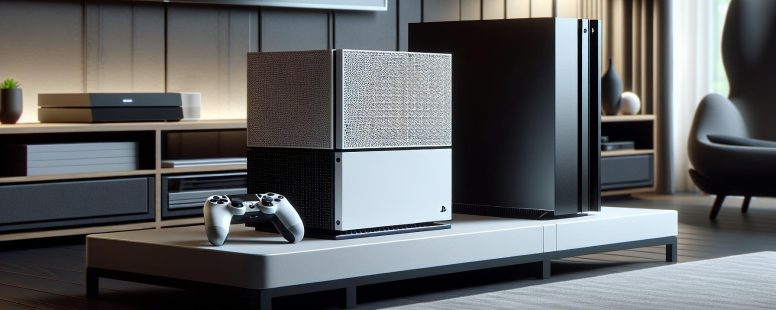
In terms of appearance, the Xbox One S introduces a sleek, minimalist design with a two-tone white and black color scheme. Its perforated top panel enhances ventilation, providing a unique visual element. Compared to the matte black finish of the Xbox One, the Xbox One S offers a modern look that complements contemporary living spaces.
Also, the absence of Kinect ports in the Xbox One S signifies a departure from the bulky design associated with Kinect functionality. This reflects Microsoft’s shift towards emphasizing slimmer, more versatile consoles. The Xbox One S also includes a vertical stand, offering flexibility in orientation, whereas the Xbox One only supports horizontal placement.
Hardware And Performance
The Xbox One and Xbox One S differ significantly in hardware and performance enhancements, influencing your gaming experience. These changes highlight improvements in processing power, graphics, and storage.
Processing Power
The Xbox One runs on an 8-core AMD Jaguar CPU clocked at 1.75 GHz, providing efficient performance. But, the Xbox One S maintains the same CPU but offers a slight clock speed boost to 1.75 GHz to 1.81 GHz, improving overall system responsiveness. This enhancement ensures smoother interface navigation and reduced load times in some scenarios. While both consoles use the same 8 GB of DDR3 RAM, the Xbox One S benefits from better heat management, enabling more consistent processing over extended gaming sessions.
Graphics And Resolution
Graphics capabilities mark a major distinction. The Xbox One supports HD resolutions, up to 1080p, making it suitable for most displays available during its release. On the other hand, the Xbox One S supports 4K Ultra HD for video playback and HDR (High Dynamic Range) for more vivid colors and contrast. For instance, streaming services like Netflix and Amazon Prime allow 4K content playback on the Xbox One S. Gaming remains at native 1080p on both consoles, but the One S features an upscaling function for 4K displays, enhancing visual clarity. This makes the Xbox One S a better option for modern 4K TVs.
Storage Options
Storage customizations vary between the two models. The Xbox One originally launched with a 500 GB hard drive, with later models offering a 1 TB option. Meanwhile, the Xbox One S starts at 500 GB and scales up to 2 TB, allowing you to store more games and media files directly on the console. Also, both consoles support external hard drives via USB 3.0, so you can expand storage as your library grows. If you prefer downloading games or frequently use entertainment apps, the Xbox One S offers greater flexibility through its larger internal options.
Features And Functionality
The Xbox One and Xbox One S vary considerably in features, shaping how users experience gaming and entertainment. These distinctions target different user preferences.
4K And HDR Support
The Xbox One S supports 4K Ultra HD video playback and HDR technology, enhancing visuals with sharper resolution and vibrant colors. This means movies on platforms like Netflix and Blu-rays appear more lifelike with rich contrasts. While the original Xbox One runs at a maximum of 1080p, it lacks both 4K and HDR capabilities, limiting its display potential on modern TVs. Gaming resolution remains capped at 1080p natively for both, but the Xbox One S can upscale games to a 4K display. If your setup includes a 4K-compatible screen, the Xbox One S offers a significant improvement in visual fidelity.
Controller Updates
Controllers for the Xbox One S include textured grips, enhancing handling during extended play sessions. They also integrate Bluetooth functionality, allowing you to connect directly to PCs, laptops, and mobile devices without the need for additional adapters. Xbox One controllers rely solely on wireless adapters for connectivity outside the console environment. Both controllers maintain the same ergonomic design and compatibility with either console. Customization and enhanced durability in the One S controllers add small but practical upgrades for players.
Kinect Compatibility
The original Xbox One includes a dedicated Kinect port, offering seamless integration with the motion-sensing accessory for voice commands and body-tracking games. By contrast, the Xbox One S omits this port, requiring a USB adapter to use Kinect. This design choice reflects Microsoft’s pivot away from Kinect, focusing instead on improvements to core features. If you’re using Kinect frequently, the additional setup with the Xbox One S might feel cumbersome. But, for users not dependent on Kinect, this change simplifies the console’s design.
Pricing And Availability
The price and accessibility of the Xbox One and Xbox One S significantly differ, influenced by their respective hardware capabilities and market trends. These factors can help you decide which console aligns with your budget and availability preferences.
Cost Differences
The Xbox One launched in 2013 priced at $499, which included the Kinect accessory. Over time, its price dropped, with later bundles costing approximately $300, excluding Kinect. The Xbox One S entered the market in 2016 with a starting price around $299 for the 500GB model, climbing to $399 for the 1TB version. Special editions, such as the Gears of War-themed console, often carried a higher cost. Current pricing varies based on condition (new or refurbished) and availability.
While you may find Xbox One models cheaper second-hand, opting for an Xbox One S might bring better value considering its 4K support, HDR functionality, and added storage options. Bundles containing the Xbox One S and popular game titles offer additional savings. For instance, family bundles with Minecraft can cost less than purchasing games and accessories separately.
Current Market Availability
The Xbox One is less widely available in official retail channels, with production discontinued in favor of newer models like the Xbox Series X. You might locate pre-owned units on platforms like eBay or GameStop. But, warranties and support may be limited for these devices.
The Xbox One S remains more accessible in some retailers and online marketplaces, as production extended beyond the discontinuation of the original Xbox One. New units, often bundled with games or accessories, can sometimes be found at competitive rates. If you’re inclined to buy an older gaming console, verifying the condition, warranty (if any), and included accessories ensures a better purchase experience.
Conclusion
Choosing between the Xbox One and Xbox One S eventually comes down to your priorities and gaming setup. If you’re looking for a more modern design, improved visuals, and added features like 4K video playback and HDR, the Xbox One S offers a clear advantage. But, both consoles deliver access to the same game library, ensuring you won’t miss out on the titles you love.
Consider your budget, display capabilities, and storage needs when making your decision. Whether you prefer the affordability of the Xbox One or the enhanced experience of the Xbox One S, either option can provide hours of entertainment.

- Equitybee Competitors - October 17, 2026
- Nutanix Competitors - October 16, 2026
- Best Alternative for Hdfc Infinia Credit Card - October 16, 2026
by Ellie B, Site Owner / Publisher